New player? Pick a guide and jump in.Independent fan guide

Last updated 2026-11-08

Confirmed — The in-game manual page has been captured publicly and cross-checked.

Hot Key Module: The Warm Button Is the Column

Quick answer

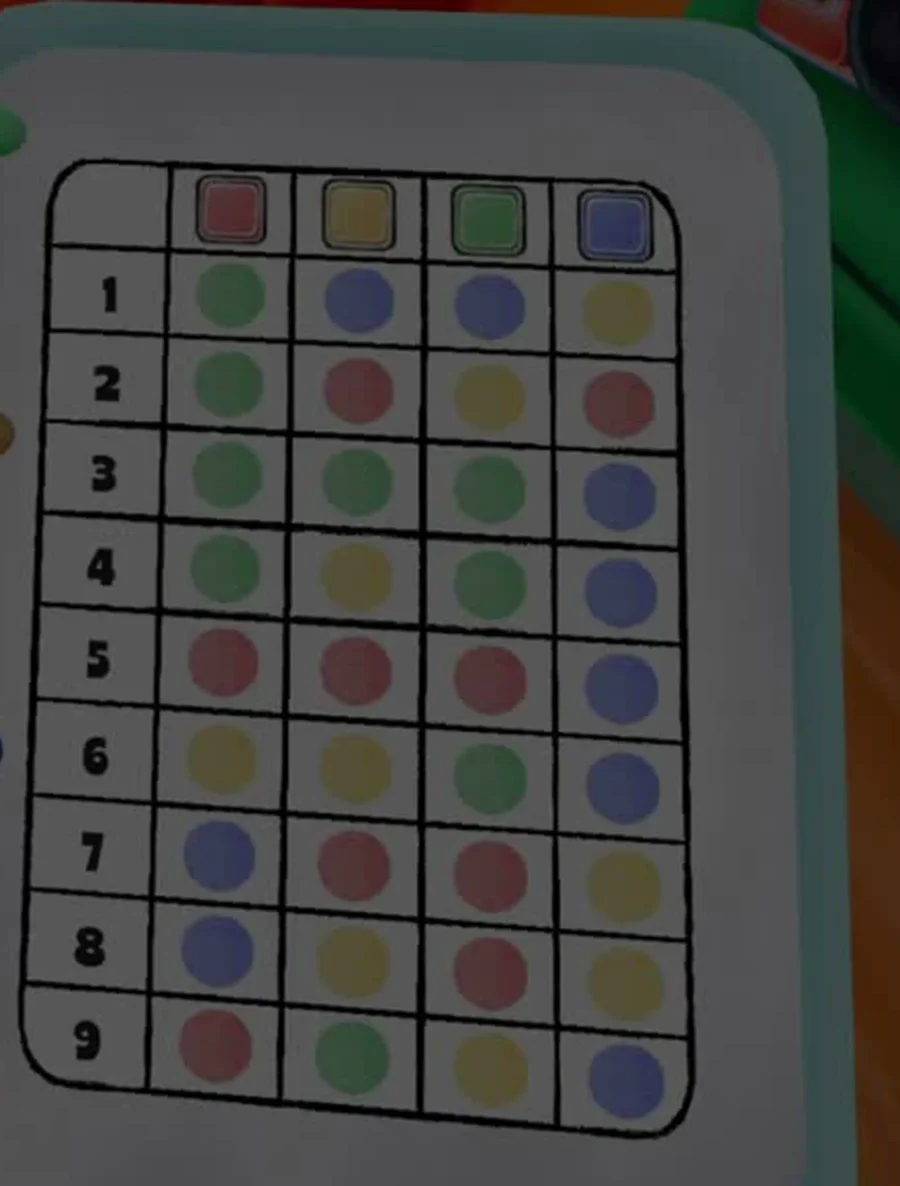
The digit on screen picks a row and the warm button's colour picks a column. The cell returns a colour, and the team presses the physical button of that colour.

Digit on screenWarm button: redWarm button: yellowWarm button: greenWarm button: blue
1GreenBlueBlueYellow
2GreenRedYellowRed
3GreenGreenGreenBlue
4GreenYellowGreenBlue
5RedRedRedBlue
6YellowYellowGreenBlue
7BlueRedRedYellow
8BlueYellowRedYellow
9RedGreenYellowBlue
BOMBANANA Hot Key module manual page: a nine-row table of screen digits against four warm-button colours, each cell holding the colour to press
The in-game manual page. Rows are the digit on screen, columns are the colour of the warm button, and each cell is the button to press. Captured from the in-game manual page and reproduced here as reference for the table above.

What to know

What the panel shows

A row of colour buttons, a digit on a small screen, and one button that is warm to the touch. The Blind Monkey finds the warm button, the Deaf Monkey reads the digit, and the Mute Monkey resolves the colour.

Finding the warm button is step one

The warmth is not a hint, it is half of the lookup. A team that skips the search and guesses a column from the buttons it can see is answering a different question, and the answer will be well-formed and wrong.

Two inputs, one colour out

The digit selects the row and the warm button selects the column, so the two reports have to arrive in a fixed order. Report the digit as a number and the button as a colour, never as a position, because position drifts once a button is pressed.

The answer is a colour to press

The cell holds a colour, not a number and not a position. The last step is finding that colour among the buttons on the panel, which is why the reply should name the colour and then let the Blind Monkey locate it.

Where the table comes from

The lookup above matches the in-game manual page, and the narration in the same clip works one case: with the third button warm and green, and 8 on screen, the answer is red. The recorded table gives red in the green column of row 8.

FAQ

How do you do the Hot Key module?

Find the button that is warm, read its colour and the digit on screen, look up that row and column in the table, then press the button of the colour returned.

Is the warm button the one to press?

Not necessarily. It identifies the column. The colour returned by the table is the button to press.

What if two buttons feel warm?

Re-search before using either, because the column changes the whole answer and a warm reading from the wrong button produces a confident wrong press.

This is an independent fan-made resource and is not affiliated with Lefto Studio. Facts on this page link to their sources above.